IRIS

Collect bins when they are full. Act on cameras you already operate.

Iris Waste reports fill on a site map so collection visits the bins that need it. Iris Vision analyses existing CCTV on a local server and delivers alerts with snapshot evidence. One sign-in, in English and Arabic.

A free demonstration of either line, or both, for two to four weeks. Iris Waste: a finished device on one bin, installed by IRIS. Iris Vision: a local server on your site; camera feeds stay with you.

TWO LINES

Iris Waste and Iris Vision.

Each line operates independently. Run both, and your team uses one sign-in.

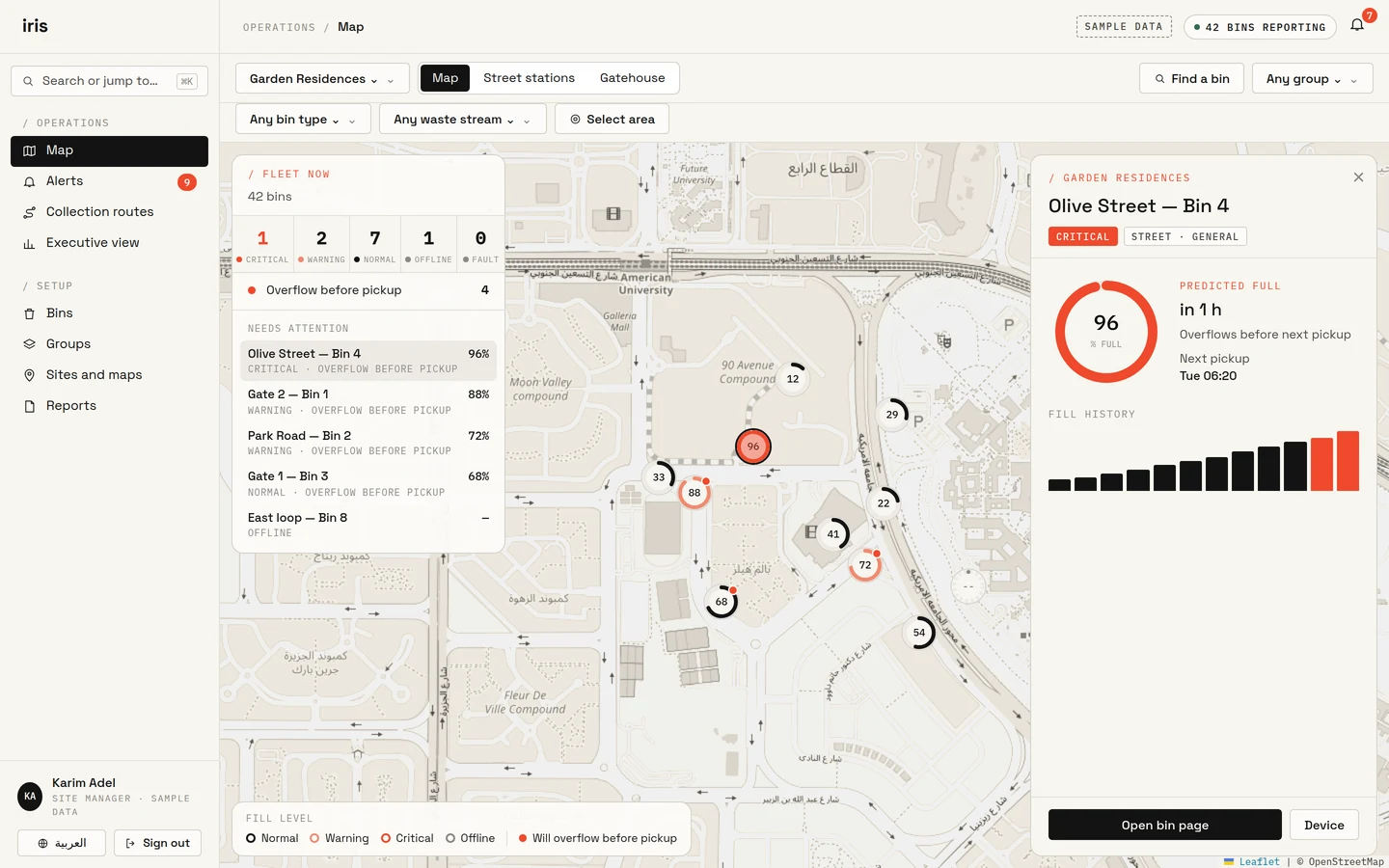
Iris Waste site map of Garden Residences: street bins as fill rings on the map, a fleet summary, and an open panel for Olive Street Bin 4 predicted to overflow before the next pickup. Sample data.

Iris Waste

Collect bins when they are full.

Each bin appears on the site map as a fill ring. Supervisors select a bin for predicted overflow and the next collection. IRIS specifies and installs the finished device.

  • Fill rings on the site map
  • Alerts and reports in the Iris Waste application
  • Finished devices, specified and installed by IRIS
Iris Waste in detail
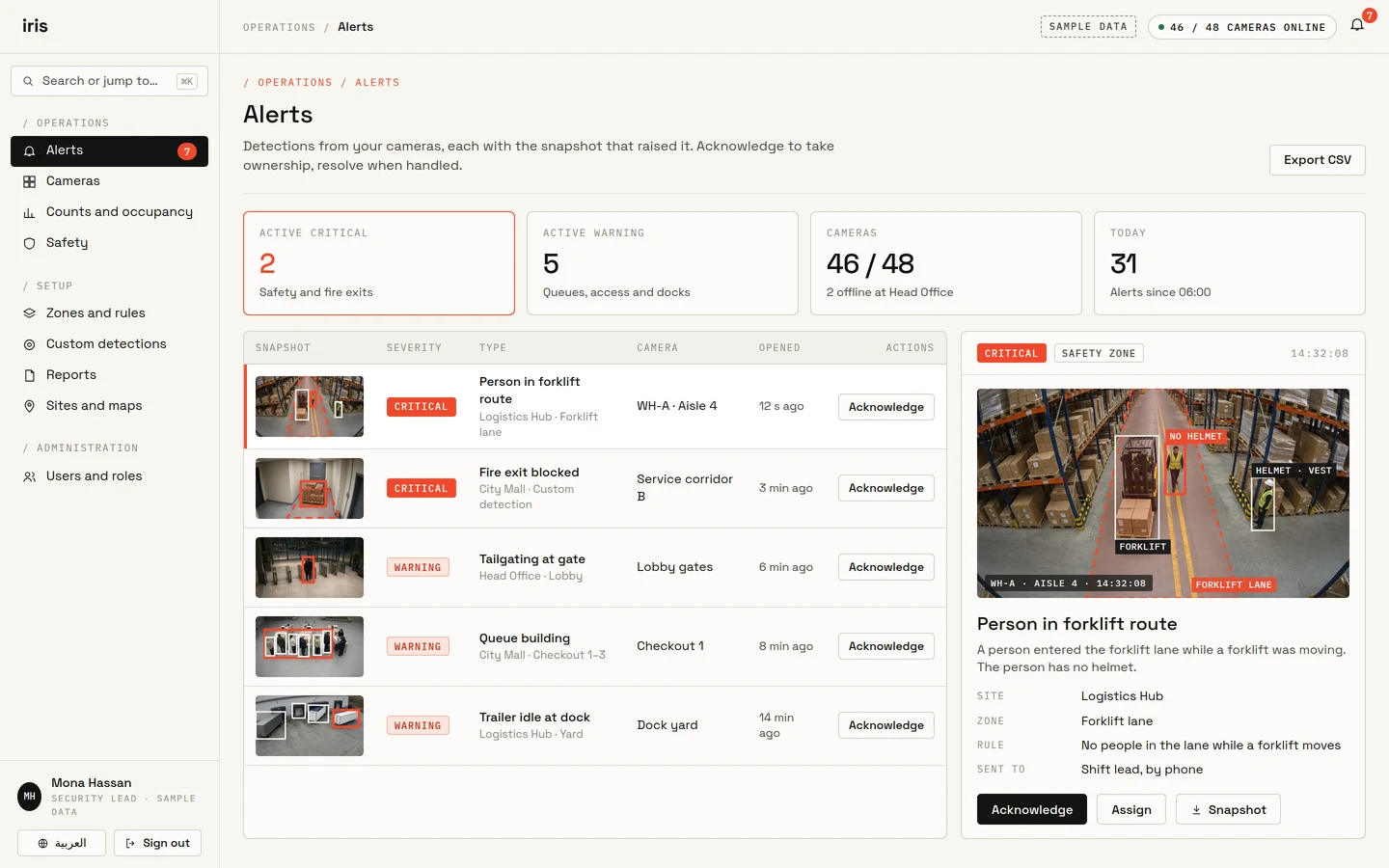
Iris Vision alert inbox with sample alerts, each with a camera snapshot, and an open alert showing a person in a forklift lane marked on the snapshot.

Iris Vision

Alerts with evidence, from cameras you already operate.

Existing CCTV and network cameras are analysed on a local server. Each alert arrives with a snapshot, the camera, and the time. Video is analysed on site.

  • Uses cameras already installed
  • Alerts with a snapshot as evidence
  • Retail, warehouses, campuses and public spaces
Iris Vision in detail

One sign-in when both lines are in use.

WHY IRIS

What operations teams receive.

One platform for both lines. IRIS specifies, installs, and runs the demonstration on your site.

  • One sign-in for both lines

    Run Iris Waste, Iris Vision, or both. Your team authenticates once.

  • Cameras already on site

    Iris Vision uses the CCTV and network cameras already installed. There is no camera replacement project.

  • Finished devices, specified per bin

    Each Iris Waste device is an enclosed product. IRIS selects sensing, power, connection and mounting for that bin.

  • Detections trained on your camera views

    The IRIS AI team can train detections for objects and events specific to your cameras. You review them before they are used.

  • English and Arabic, including right-to-left

    This site and the applications are provided in both languages.

  • Hosted by IRIS, or inside your organisation

    IRIS can host the service, or operate it where the system must remain with you. IRIS installs either arrangement.

WHERE IT IS SPECIFIED

Typical environments for each line.

Iris Waste is specified for bins and refuse rooms. Iris Vision is specified for gates, floors, docks and public spaces, using cameras already installed.

Iris Waste environments

  • Residential compounds: street bins and refuse rooms.
  • Hotels: kitchens, floors and service bins.
  • Malls: concourses and refuse rooms.
  • Hospitals: wards, kitchens and service rooms.
  • Offices and campuses: floors and refuse rooms.
  • Warehouses and yards: indoor rooms and outdoor bins.
  • Municipal streets and public bins.
  • Airports, ports and comparable sites.

Iris Vision environments

  • Residential compounds: gates, lobbies and shared areas.
  • Hotels: lobbies, guest floors and service corridors.
  • Malls: concourses, queues and doors.
  • Hospitals: entrances, waiting rooms and restricted doors.
  • Offices and campuses: doors, floors and parking.
  • Warehouses: aisles, docks and safety zones.
  • Cities: plazas, corridors and transit stops.
  • Airports, ports and comparable public spaces.

HOW YOU START

A free demonstration on your site.

Two to four weeks. The IRIS team replies by email within 24 hours on weekdays.

Iris Waste: one bin

IRIS configures the software and installs a finished device on one bin at a location you choose.

IRIS
Installs one finished device and configures the software
You provide
One bin, and power and network near it
Duration
2–4 weeks
Request a Waste demo

Iris Vision: cameras already on site

IRIS installs a local server on your site. Your camera feeds go to that server and stay with you. IRIS confirms details after a site review.

IRIS
Installs a local server. Camera feeds go to that server
You provide
Cameras already installed on site, and a site contact
Duration
2–4 weeks
Request an IRIS Vision demo

WHERE IT RUNS

Hosted by IRIS, or inside your organisation.

IRIS hosts the service.

Your team signs in. IRIS operates and maintains the service.

Deployed inside your organisation.

Where the system must remain with you, IRIS operates it there. The IRIS team configures that arrangement with you.

Access and records

  • People see only what their role allows.
  • Changes are recorded: who changed what.
  • For Iris Vision, camera feeds go to a server IRIS installs on your site. They never leave your servers.

Works with systems you already run.

Reports and alerts can reach the systems your team already uses, such as SAP, Oracle or Power BI.

REQUEST A DEMO

Run IRIS on your site.

Identify the site. The IRIS team replies by email within 24 hours on weekdays.

Request a demo